Trade cryptowith lower fees

No hidden spreads. See exactly what you pay.


What is Cube Exchange?

One account. Every market. No KYC.

Cube Exchange is a non-custodial crypto trading platform that connects centralized and decentralized markets in a single account. Trade Bitcoin, Ethereum, Solana, and 1,420+ tokens - no identity verification required to get started, deposit, or withdraw.

How to trade crypto with AI in 2026?

20+ AI trading skills, not a grid

Most crypto trading bots are pre-built grid strategies. Cube made AI trading bot with Claude and MCP. AI bot has 20+ hedge fund skills running on a 200μs HFT API. While you sleep, your money works.
cube-exchange / open-source
~git clone https://github.com/cube-exchange/cube-trading-bot
Cloning into cube-trading-bot...
remote: Enumerating objects: 1042, done.
remote: Counting objects: 100% (1042/1042), done.
remote: Compressing objects: 100% (621/621), done.
cube-trading-botnpm install
added 412 packages, and audited 413 packages in 3s

Multi-asset access

1,420+ tokens. One account.

BTC, ETH, SOL, and 1,420+ altcoins — all accessible without switching wallets or platforms. Make your money work for you.
One account, every market

Human help

Stuck? A real person answers - 24/7.

Cube's 24/7 concierge gives you direct answers on onboarding, funding, and account access - not a help article queue.
Support when timing matters

What are the top 3 crypto apps in 2026?

The app that is ready before the market moves.

You see Bitcoin drop 8% in 3 minutes. You open Coinbase. It is loading. You open Robinhood. It is loading. By the time either app is ready, the trade you wanted is gone.
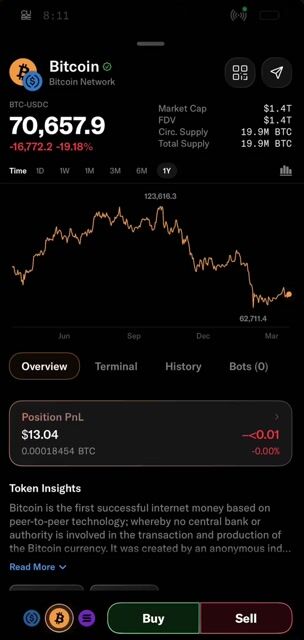
Cube has no lag when volume spikes, thanks to native iOS and Android apps. To buy Bitcoin, place limit orders directly on the price chart, no separate order screen. Rest assured your keys are stored locally on your device, protected by Secure Enclave.

Interactive globe showing Cube data center locations.

  • Tokyo TY11
  • Stockholm SK2
  • Pittsburgh PIT1

Where should I trade crypto?

Trade where you get the best price

saving 0.4-1.2% per trade, up to $2,000 per year for active traders.

  1. Which crypto exchange gives you the best price?

    Cube routes across USDC, USDT, and DeFi markets

    Most exchanges split liquidity across markets, reducing depth by 40–60%. Cube uses implied matching to route every order across USDC, USDT, and DeFi simultaneously. Buying ETH with BTC - Cube automatically routes through ETH/USDC and BTC/USDC, finding a better price than the direct book alone. Best price, under 200 microseconds.

  2. How do you avoid high slippage when trading crypto?

    $2.7 Billion Lost to Slippage in 2024, not on Cube.

    Traders absorb 0.4% more slippage per order than institutions, $40 on a $10,000 trade. Standard exchanges hit 0.8–1.2% slippage during peak volatility. Cube co-location at TY11, SK2 and PIT1; Market Price Protection, and liquidity aggregation deliver a 10x reduction in slippage.

  3. How do I buy crypto automatically without watching the market?

    Use built-in TWAP and DCA on Cube

    Automated execution, using TWAP on major platforms reduces price slippage by 15–22%. Cube used TWAP to execute a $350,000 position over a week, achieving a 7.5% improvement over VWAP. TWAP and DCA algorithms are built natively into Cube Exchange, Cube executes automatically from your non-custodial MPC vault.

How do I keep my crypto safe?

Your keys. Your assets. Always.

Cube.Exchange uses multi-party computation (MPC) technology so your private keys are never held by us. The Guardian Network monitors infrastructure and signing in real time - your assets stay in your control even if Cube.Exchange goes offline.

Control systems

Real-time node monitoring

Guardian nodes observe infrastructure health and signing flow continuously so the platform can respond quickly without exposing private key material.

guardian-01

guardian-02

guardian-03

Settlement assurance

Audit-ready movement

Transfer, settlement, and operational workflows are designed to remain transparent, reviewable, and ready for treasury-grade controls.

Compliance

Institutional controls

Guardians monitor signing flow and infrastructure health continuously. Anomalies are flagged and contained in real time without exposing key material.

Institutional controls

Sub-accounts and permissioning

Granular role-based access for traders, risk managers, and auditors. The same controls used by institutional desks ship standard on every Cube account.

Strategic partners

GSRFlowdeskSusquehannaAcheron TradingAnagram

What is the best crypto exchange in 2026?

Low fees. Deep markets. Your keys, your coins.

Transparent fees with no spread markups, access to every major market, and MPC custody that means no single party can touch your funds. Here's how Cube compares to centralized and decentralized exchanges across the categories that actually matter.

Exchange typeExecution speedCustody modelSettlementInstitutional toolsFee structureOnboarding
Cube Exchange

200μs matching engine in TY11 Tokyo

MPC custody - no single party holds a full key

Real-time on-chain settlement

Sub-accounts with granular permissioning

Transparent tiered fees, no spread markups

Guided flow, funded account in minutes

Centralized Exchanges

Fast but variable, routed through internal layers

Centralized and pooled in omnibus wallets

Withdrawal queues with manual review delays

Gated behind enterprise tiers or upsells

Spread markups and hidden conversion fees

Complex interfaces that assume prior experience

Decentralized Exchanges

Limited by block times and network congestion

Full self-custody, no counterparty risk

On-chain but gas fees on every transaction

No sub-accounts, permissioning, or audit trails

Gas + slippage + MEV on larger orders

No fiat on-ramp, wallet setup required

The architectural approach Cube has taken to MPC security and settlement is exactly what the institutional market has been waiting for.

Managing Director

Apex Capital

Knowledge base

Frequently Asked Questions.

How does Cube.Exchange’s technology ensure that I maintain control and ownership of my digital assets?

+

Cube.Exchange has developed state-of-the-art, multi-party computation (MPC) technology that enables you to create an MPC Vault for holding your digital assets so that they are always within your control and ownership. You are never required to move your digital assets into Cube custody to trade on Cube.Exchange. Your assets remain in your MPC Vault and your custody and control.

Once you create a Cube Client Account, you initiate a distributed key generation to securely generate the private key material that constitutes ownership of your own MPC Vault. The MPC Vault supports the common derivation of one or more segregated non-custodial digital MPC wallets for each native blockchain.

Your MPC Vault is a collection of all of your MPC Wallets. For example, you may have a BTC MPC Wallet, an ETH MPC Wallet, and a SOL MPC Wallet, all within your MPC Vault.

The distributed key generation process involves you, Cube.Exchange, and an independent network of trusted third parties – the Guardians. Upon creation of your MPC Vault, you will receive a PDF document containing your share of the distributed key material protected by a two-of-three signature threshold. It is your responsibility to store the PDF of your key share in a secure place. The distributed key material helps ensure your funds are safe as its shares are used to support settlements on the exchange.

This use of MPC technology enables your non-custodial control and ownership of your funds, which means only you have access and authority to move your funds. Your funds are never co-mingled with another user’s funds. This protects your assets from exchange bankruptcy, misuse, or “bank-run” issues many exchanges have had.

For more detailed information on how your MPC Vault works, please review our Terms of Service

How do I deposit digital assets into my MPC Vault?

+

Once you have created your MPC Vault and completed your KYC verification, your public addresses on each native blockchain are known. You can simply navigate to Cube.exchange/portfolio and select the “Add Funds” button in the upper righthand corner of your screen. You will be given an option of either crypto or fiat deposit.

Cryptocurrency Option

If you desire to deposit cryptocurrency that you currently hold elsewhere, just select the type of cryptocurrency you would like to send to your MPC wallet. You will then be shown the MPC wallet address for that cryptocurrency within your MPC Vault that you can copy for the transfer. We also provide you a QR code of the MPC wallet address that you can scan for the transfer.

Fiat Option

At this time you cannot store fiat on their Cube.Exchange account. However, through our payment partner, you can purchase USDC via your bank account and/or a credit card (depending upon jurisdictional limits) that will be deposited directly into your MPC Vault by our payment provider partner. The USDC is instantly in your custody and ownership in your MPC Vault after your purchase from our payment provider partner and does not transfer at all through Cube.

To use this fiat option through our payment provider partner, you must have completed Level 2 KYC verification with Cube, which is shared with our payment provider partner so that you will not need to complete additional KYC verification processes with it.

How do I withdraw digital assets from my MPC Vault?

+

If you would like to withdraw assets from a MPC wallet within your MPC Vault, navigate to your Cube.exchange/portfolio page and select the “Withdraw” toggle next to the cryptocurrency you wish to withdraw.

You will then be shown a familiar UI where you can enter the address you would like to withdraw to on the respective chain.

Once sent, this triggers a notice to Cube.Exchange that you are withdrawing digital assets.

Your notice of withdraw allows Cube to check to see if you have any open orders or matched but unsettled trades on Cube.Exchange. Provided that the balance of digital assets in your MPC Vault is greater than any minimum balance requirements needed to satisfy any of your open positions and matched but unsettled trades on Cube.Exchange, you may withdraw and transfer any amount of assets, up to the total amount of assets in your MPC Wallet in excess of such minimum balance requirements.

What if Cube.Exchange does not respond to my notice that I am withdrawing digital assets from my MPC Vault?

+

If the settlement layer has not processed a net settlement in 48 hours, the Guardians may independently support the user in transferring funds out of their MPC Vault. This backup function with the Guardian Network is primarily designed to ensure that you are able to withdraw your funds from your MPC Vault in the event that Cube.Exchange elects bankruptcy or is forced into liquidation as your funds are owned by you and not in the custody of Cube.Exchange.

Notwithstanding the foregoing or any other provision of these Terms, Cube.Exchange may “freeze” a Client Account due to identified illicit activity such as sanctions violations, exposure to high-risk wallets, exposure to wallets previously identified to be belonging to terrorist financing and whenever it finds that the activity may be above the risk tolerance of Cube.Exchange. If a Client Account with a frozen account requests that the Guardian Network force a net settlement and a withdrawal of Digital Assets from the MPC Vault, the Guardian Network will not take action on any withdrawal orders as well. You agree and acknowledge that this would result in you having your Digital Assets “frozen” in your MPC Vault until you resolve the issue involved.

How does trading on Cube.Exchange work?

+

The beauty of Cube’s MPC technology is that when you place an order on Cube.Exchange, you are not required to move any assets from your MPC Vault. It remains in your custody and ownership. Cube.Exchange does not touch your Digital Assets.

Once your trade order is matched on Cube.Exchange, the bona fide matched transaction result is published to the settlement layer known as CubeNet, a meta-L2 blockchain. Importantly, your balance on Cube.Exchange immediately reflects the result of the matching and does not wait for the settlement to complete.

To place an order on Cube, you first must complete KYC verification with your account.

Once KYC is complete you will be able to trade on the spot market, make use of the convert tool or Cube.exchange bundle feature.

Spot Market

Cube.exchange spot market will feature a familiar trading UI were you can make your typical Market, Limit, buy and sell orders, along with our very own patented trading tools to level the playing field!

In depth guides on our extra features are coming soon!

Convert Tool

Cube.exchange/convert allows you to quickly exchange your currency at a market price while also allowing some control over the spread.

Bundles

https://www.cube.exchange/bundle allows you to quickly trade USDC into multiple currencies at an even split for fast trading and immediate access to different currencies at once

How do trading settlements on Cube.Exchange work?

+

Cube's unique approach keeps your funds in your own vault, making the settlement process decentralized and secure.

When a trade is matched, your balance on CubeNet will be updated to reflect the change. However, settlement on the primary blockchain (L1) may not have occurred yet. Due to different block times and fee structure of each primary blockchain (L1), Cube groups matched transactions together before broadcasting them on chain. Additionally, during times of high network congestion on the primary blockchains (L1) or increased transaction volume on Cube, trades may be combined over longer periods before final settlement.

This means that settlements can take up to 24 hours. However, you can continue to trade with your funds using the exchange layer as you await the processing of the net settlements of the trades. While funds are being settled, they will be unavailable for withdrawal.

If the settlement layer has not processed a net settlement in 48 hours, the Guardians may independently support the user in transferring funds from their MPC Vault.

For more detailed information, please review our Terms of Service

How can I sign in without a Gmail account?

+

To access Cube.Exchange you will need to use one of our OAuth login options, such as Google. You can register your non-

email address to allow you to do this.

  • Step 1: Select Google as your sign-in option or “Sign in” at the top of the home page
  • Step 2: Select the option to “Create Account”
  • Step 3: Enter your details and then when choosing your email address
  • Step 4: Enter your personal email address to link it with Google and follow the steps to verify the account and accept Google account creation
  • Step 5: Complete! You can now use your non-Gmail address to Sign in with Cube

What fees are associated with using Cube Exchange

+
  1. Trading Fees Visit our Fee Schedule for updated information on trading fees.
  2. Deposit Fees When depositing cryptocurrency to your Cube Exchange account, no fees are charged. However, you'll incur a small network fee to cover transaction processing by miners.
  3. Withdrawal Fees In Cube Exchange’s early access period, all withdrawal confirmation fees are free, paid for by Cube Exchange.

What happens if Cube.Exchange identifies illicit or risky activity related to a MPC Vault?

+

Cube.Exchange may “freeze” a Client Account due to identified illicit activity such as sanctions violations, exposure to high-risk wallets, exposure to wallets previously identified to be belonging to terrorist financing and whenever it finds that the activity may be above the risk tolerance of Cube. If a Client Account with a frozen account requests that the Guardian Network force a net settlement and a withdrawal of Digital Assets from the MPC Vault, the Guardian Network will not take action on any withdrawal orders as well. This results in a user having its digital assets “frozen’ in its MPC Vault until it resolves the issue involved.

Built different

You read the whole page. What are you waiting for?

No upfront costs. No withdrawal fees. Every trade earns rewards.